
Reorder Radar for Wholesale
Keep your wholesale business on track with Reorder Radar. This tool analyzes your order history to help you predict when customers are ready to reorder, letting you turn data-driven insights into actionable opportunities with ease.
Accessing Reorder Radar
Step 1: Open Reorder Radar from your Shopify admin or integrations panel.
Reviewing the Dashboard
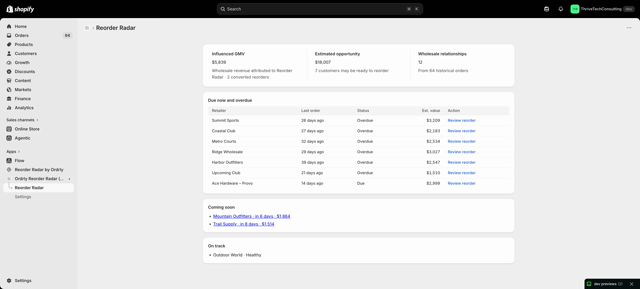
Step 2: Review the main Reorder Radar dashboard. You’ll find cards for customers likely to reorder soon. Each card shows details like past order count, average reorder interval, and estimated value.
Interpreting Reorder Insights
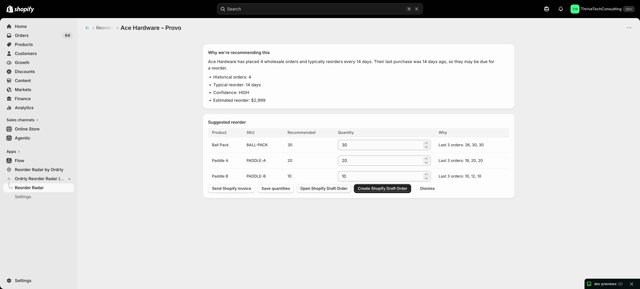
Step 3: Click a customer card—like Ace Hardware—for a full reorder profile. Here, check typical reorder patterns, past orders, intervals between purchases, and the predicted next order date.
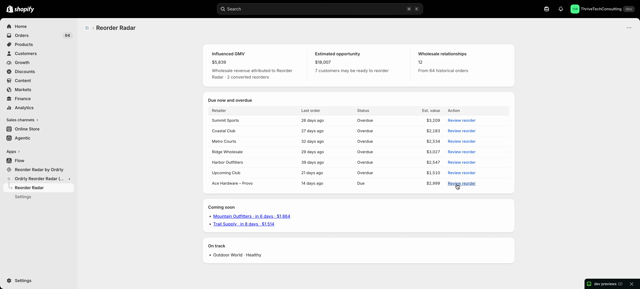
Step 4: Scroll to see Reorder Radar’s confidence level for each prediction, alongside a summary of likely reorder items. All insights reflect the customer’s actual purchasing data.
Turning Suggestions into Draft Orders
Step 5: Ready to act? Click Convert to turn Reorder Radar’s suggestion into a Shopify Draft Order. The draft auto-populates with recommended products and quantities.
Monitoring the Action Pipeline
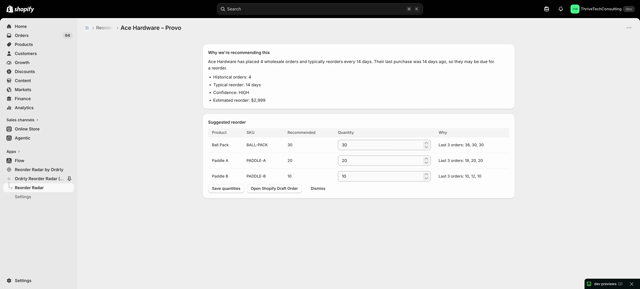
Step 6: Monitor upcoming reorders in your pipeline. This keeps your team focused and ensures you never miss an opportunity. Accounts without active reorder signals remain out of sight to reduce distractions.
Conclusion
Take the guesswork out of managing restock cycles. Reorder Radar helps you anticipate demand, minimize missed opportunities, and build long-term relationships with your wholesale customers.